The short version
If you already have the document and the fax number, this is the whole job:
- Open an online fax service and sign in.
- Upload the document. A PDF is the safest file to send.
- Enter the recipient’s fax number, including the country code.
- Send it, and save the confirmation.
A web browser is enough. The walkthrough further down uses Dropbox Fax, our pick for sending faxes. It costs less than most of the services we compared, whether you send one fax or use it every week.
Send a fax with Dropbox Fax (opens in a new tab)How a fax gets there
A fax is a phone call that carries a picture of a page. Online faxing does not replace that call. It replaces the scanner and the machine on your side.
-
1
You upload a file
A PDF, a Word document, or a photo of a paper form. You do this in the browser, on a computer or a phone.
-
2
The service makes a fax image
Fax machines do not receive PDFs. They receive a black-and-white picture in the Group 3 format set by ITU-T T.4. On the internet side, that picture is commonly wrapped in a TIFF file. RFC 3949 defines that file format, called TIFF-FX. The service has to read your document to build this image.
-
3
A carrier dials the fax number
The service hands the fax to a telecom provider. That provider calls the recipient’s fax line on the public switched telephone network, the PSTN. When part of the route runs over the internet, the carrier can use T.38, the ITU standard for a live Group 3 fax over IP, until a gateway finishes the call on a normal phone line.
-
4
The other end prints or stores it
A physical fax machine prints the pages. If the recipient also uses an online service, that service saves a PDF instead. During the call both ends follow ITU-T T.30, which sets the call up, sends the pages, and closes it.
-
5
A confirmation comes back
If the pages arrive, the receiving machine confirms that under T.30. Your service then marks the fax as sent, or emails you a receipt. That receipt means the machine accepted the transmission.
What you need
- The document, preferably as a PDF.
- The recipient’s fax number, with the country code.
- An account at an online fax service.
- A computer or phone with a browser.
You do not need a fax machine, a landline, or an app. An app is optional, and only some services offer one.
Sending and receiving are different. Sending uses the other person’s fax line. Receiving on a number of your own means the service has to keep a phone number for you, and that is usually a paid plan. Dropbox says its free accounts can send, and a paid plan is required to receive. Inbound numbers there are for the US, UK, and Canada.
Our pick: Dropbox Fax
We compared Dropbox Fax, Fax.Plus, Faxly, Faxer, iFax, HumbleFax, and eFax on the price each one publishes, and on who holds the document. Dropbox Fax is our pick for faxing in general. It is cheaper than most of them, from a single fax through a busy month, and it is a company people already trust with their files.
Cheaper than most
A new account includes 5 outbound pages, and you can earn up to 20 more, once. Those pages do not renew. After that, pay as you go is $0.99 for a fax of up to 10 pages, then $0.20 a page. Home Office, the first paid plan, is $9.99 a month or $99.99 a year for 300 or more pages, and it includes a number for receiving. The free-page count matches Dropbox’s help article updated July 8, 2026.
The table uses those rates against the other published prices. One-time free pages and introductory passes are left out. Subscription rows are the monthly fee, which you pay even for a single fax. Dropbox’s first two columns are pay as you go. The 100-page column is Home Office. Each 3-page fax sits inside the 10-page cap, so ten of them are 10 × $0.99.
On a small screen, swipe the table sideways to see every column.
| Service | 1 fax, up to 10 pages | 10 faxes, 3 pages each | About 100 pages |
|---|---|---|---|
| Our pickDropbox Fax | $0.99 | $9.90 | $9.99 |
| Fax.Plus | $6.99/mo plan, or $10 credit | $6.00 credit, or $6.99/mo | $6.99/mo, or $20 credit |
| HumbleFax | $10 | $10 | $10 |
| iFax | $12.49 | $12.49 | $12.49 |
| eFax | $18.99 | $18.99 | $18.99 |
| Faxer | $19.95 | $19.95 | $19.95 |
| Faxly | $19.99 / 4 weeks | $19.99 / 4 weeks | $19.99 / 4 weeks |
Dropbox’s $9.90 is ten faxes at $0.99. The $9.99 is Home Office, which covers 300 or more pages, so a hundred pages stays on that bill. Pay as you go is the wrong tool for a pile of short faxes: eleven faxes of up to 10 pages is $10.89, and a hundred one-page faxes would be $99. Use Home Office once you are sending most weeks. Billed yearly, Home Office is $99.99, which the pricing page shows as $8.33 a month.
Fax.Plus is the one that costs less at the two higher volumes. Thirty pages of US credit is 30 × $0.20 = $6. Purchases start at $10, so the first buy is $10 and the unused portion stays on the account. A hundred pages of credit is $20. Basic is $6.99 a month when billed annually ($83.99 a year), or $8.99 month to month, with 200 pages. That plan is less than Home Office if you send around 100 pages a month.
The other five cost more at all three volumes. HumbleFax is $10 a month for unlimited faxing, within a few cents of Dropbox at the higher volumes. iFax Basic is $12.49. eFax Personal is $18.99 a month, or $15.83 a month billed annually ($189.96 a year), which is still more than $9.99. Faxer is $19.95 a month after its three-day intro. Faxly is $19.99 every four weeks after its 48-hour pass. The first-week prices are not in the table.
Pay for one fax, or keep a plan
Sending does not require a subscription, so a quiet month does not start a bill you have to cancel. Home Office is there when you want a fax number and a monthly stack of pages. The pricing page also shows a $2.50 first month on that plan. Several of the other services open on a short paid pass that becomes a subscription unless you cancel.
Dropbox is the brand you already trust with your files
Whoever sends the fax has to open your document, convert it, and keep a copy so you can see the history. Pick a company you would trust with that file. Dropbox is already where a lot of people keep personal documents. Its fax site says transmissions are encrypted. That is a statement about their service. The sheet that prints on the other end is still a normal fax.
Send a fax with Dropbox Fax (opens in a new tab)How to send a fax with Dropbox Fax
Four screens, in order. These are the Dropbox Fax website. The button labels below match the product.
-
1. Open Dropbox Fax and choose Send a Fax
On the home screen, click Send faxes in the left sidebar, or the Send a Fax card. That card is separate from Send a signature request.
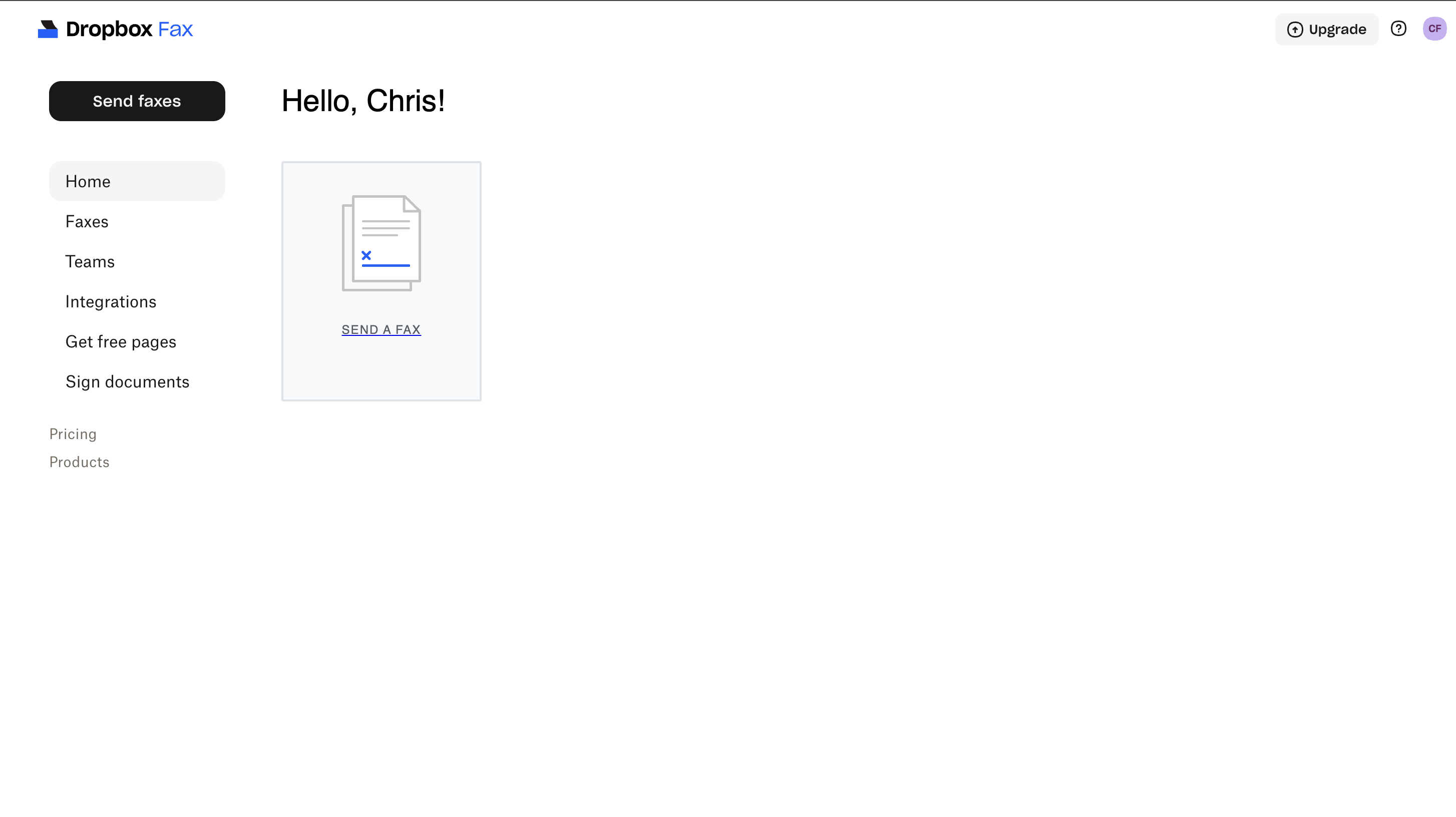
The home screen. Send faxes is in the sidebar. Send a Fax is the card on the left. -
2. Upload the document
The next screen asks “What needs to be faxed?” Drop a file in, upload one from your computer, or pick a file from Dropbox or Google Drive. Then click Next.
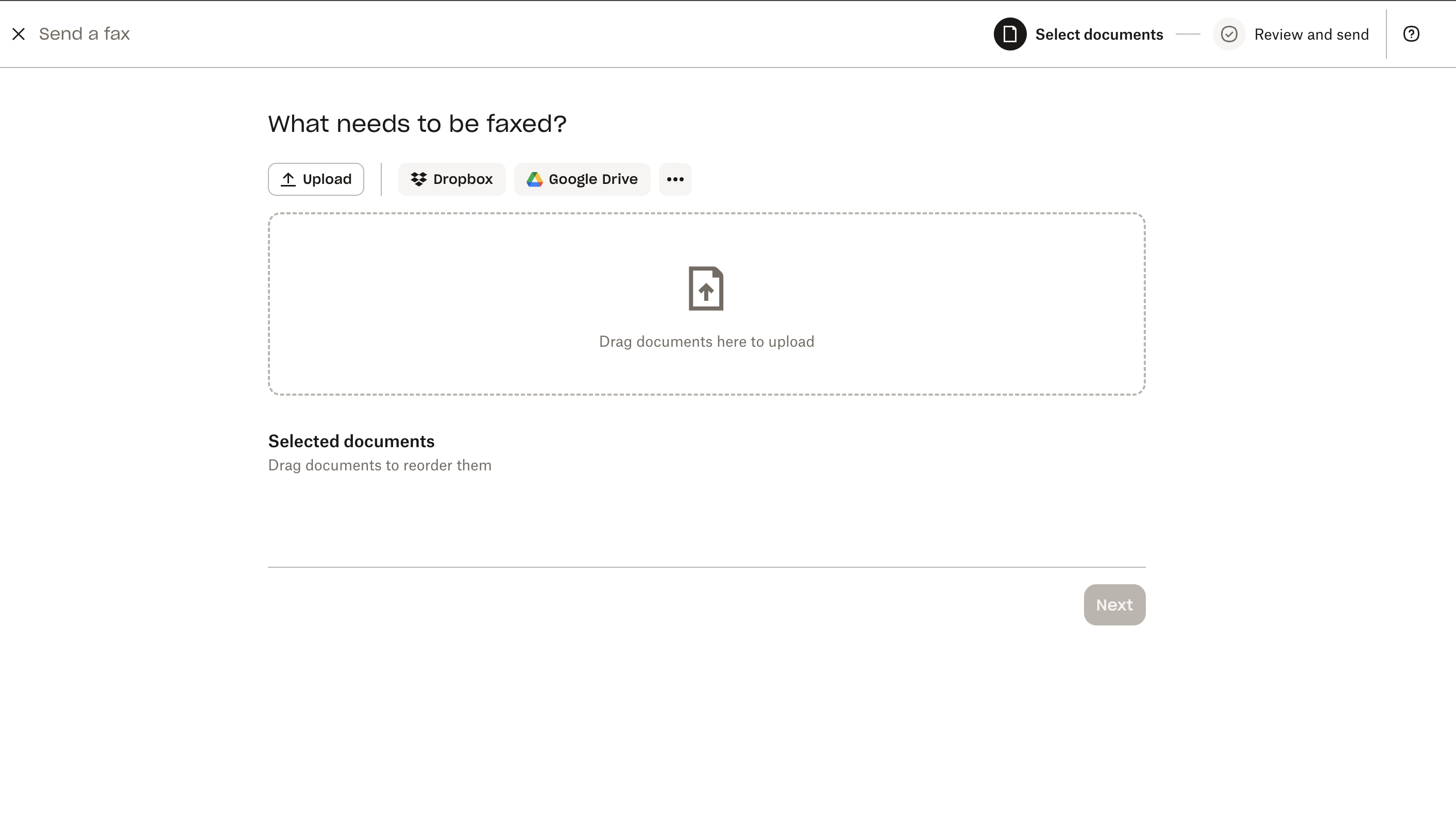
Upload is selected. The other tabs pull a file from Dropbox or Google Drive. -
3. Enter the recipient’s fax number
The screen asks “Who should receive a copy?” Type a fax number, with the country code, or an email address. The box shows an international example. Click Add another recipient if more than one person needs the document, then click Next.
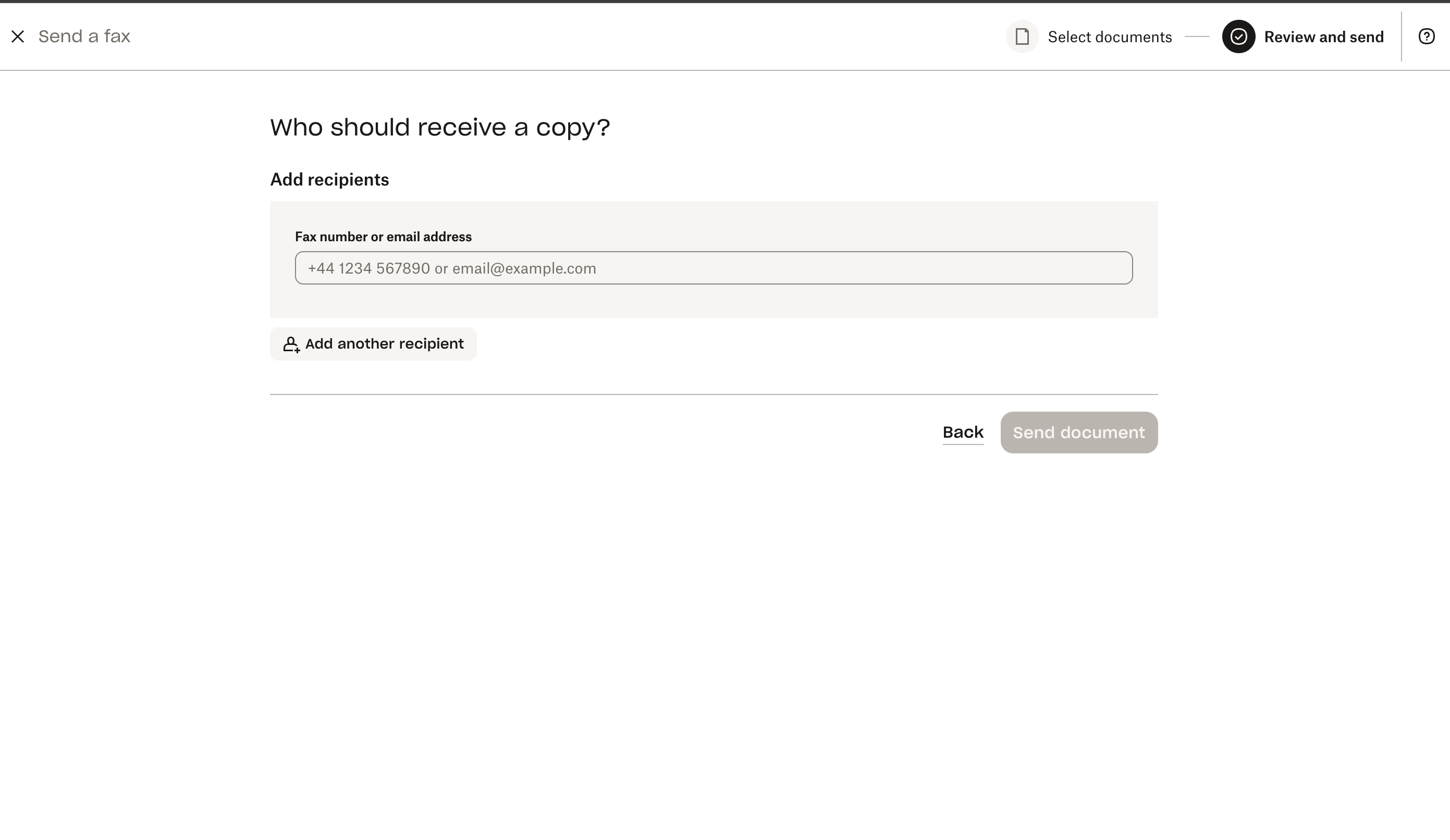
The number field is empty here. The placeholder starts with a country code. -
4. Review the options and send
Check the number and the country next to it. You can turn on “Send high-resolution colour version of fax” or “Add cover page”. Both are optional. Then click Send document.
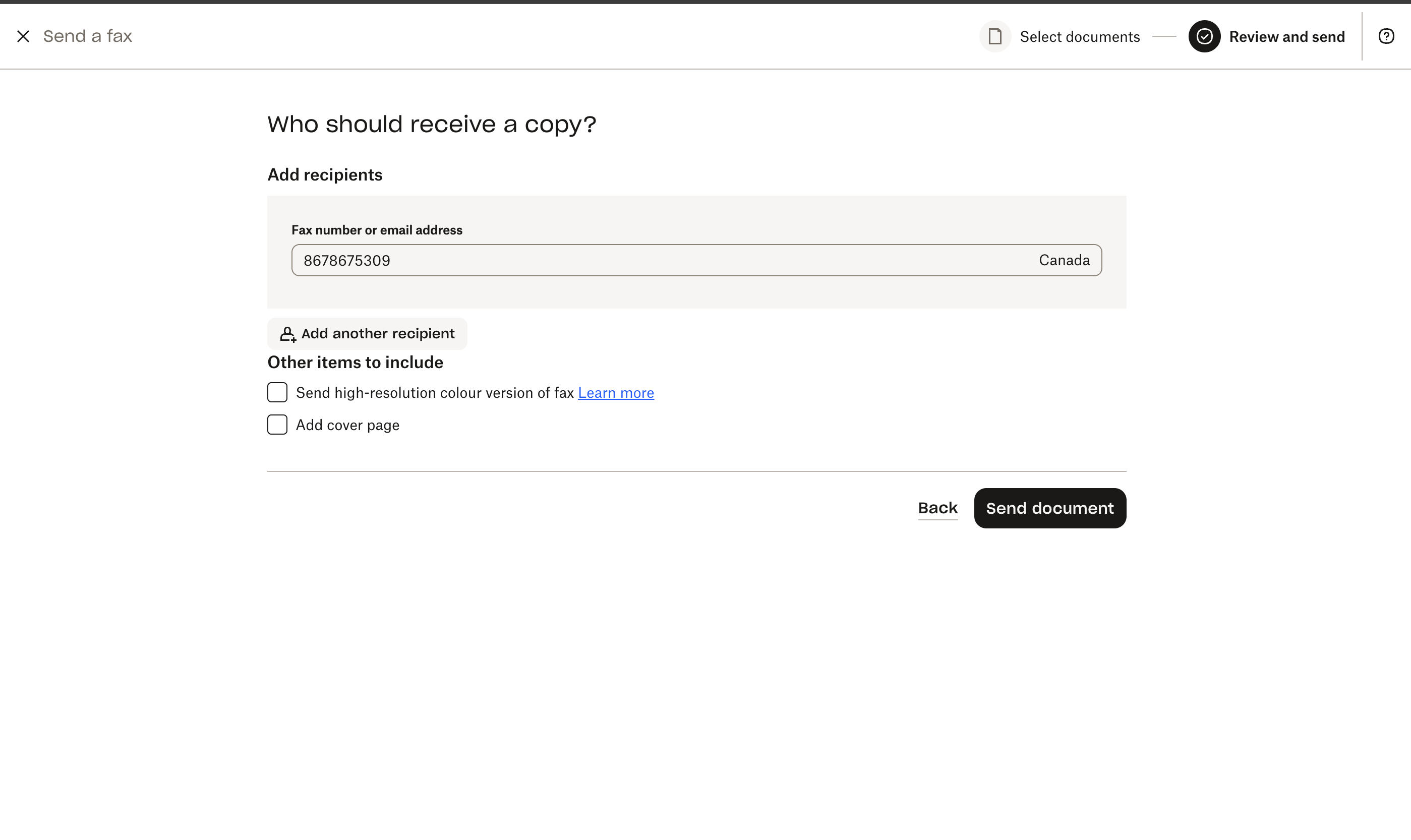
An example Canadian number is filled in. Cover page and colour are checkboxes. Send document is the black button.
How the services compare
Prices are from each company’s own site, checked in October 2026. The starting price is the lowest published way to send, in US dollars. Open the link before you pay. Plans change.
On a small screen, swipe the table sideways to see every column.
| Service | Pricing model | Free tier | Starting price | Notable |
|---|---|---|---|---|
| Our pickDropbox Fax | Pay as you go, or a subscription | 5 pages, plus up to 20 more, once | $0.99 per fax, up to 10 pages | Then $0.20 a page. Home Office is $9.99/month or $99.99/year, with a $2.50 first month shown on the page. Receiving needs a paid plan. |
| Fax.Plus | Subscription, or prepaid credit | 10 send pages, once, after mobile verification | $6.99/month, billed annually | Basic is $8.99 month to month for 200 pages. Credit is $0.20 per US page, $10 minimum. A business associate agreement is on Enterprise only. |
| Faxly | Paid pass, then a subscription | None | $1.99 for 48 hours, then $19.99 every 4 weeks | Their rate card lists 50 pages on the pass and 500 per cycle. Cancel within 48 hours if you do not want the plan. Other currencies appear by region. |
| Faxer | Subscription | None | $0.99 for 3 days, then $19.95/month | Sold as unlimited outbound faxing to 40+ countries, with delivery confirmation. The subscription renews after the intro. |
| iFax | Subscription | None listed | Basic, $12.49/month | Basic is 200 send pages. Plus is $24.99/month for 500 pages, a number, receiving, and the plan that lists HIPAA compliance. |
| HumbleFax | Subscription | None stated | $10/month | Their FAQ says that price covers unlimited send and receive, a dedicated local number, and no overage charges. |
| eFax | Subscription | None listed | Personal, $18.99/month | 200 pages a month to the US and Canada, or $15.83/month billed annually. Extra pages are $0.10. Business is $39.99/month, covers 51 countries, and includes a business associate agreement. |
eFax’s plan details list Personal at $18.99 a month. A separate button on that pricing page says “Start for Only $14.99” and does not state the billing period, so read the checkout screen. HumbleFax publishes its price in its FAQ. We did not find a separate pricing page.
Fax.Plus states the $6.99 annual price on its pricing page ($83.99 billed annually) and the $8.99 monthly price, the $0.20 credit rate, and the 10-page allowance on its cost page. Destination and transmission time can change how many of those pages a fax uses.
Practical questions
Is it easy?
Yes. The job is an upload and a phone number. The first time, leave a few minutes for the account. Read the number back before you send, including the country code. A clean PDF survives the conversion to a fax image better than a crooked photo of a form.
Is it safe?
The upload travels over the site’s encrypted connection. After that, the service can read the file, because it has to turn the file into a fax image, and it keeps a copy for your history. Treat that the way you would treat any company holding a scan of the document.
The phone-network hop is a normal fax call under ITU-T T.30. Whoever can see the machine on the other end can see the pages. When the number is not one you use often, confirm it with the office first. Dropbox’s fax site says its transmissions are encrypted. That covers their handling of the file. It does not encrypt the sheet of paper at the far end.
What does it cost?
Dropbox Fax is $0.99 for a fax of up to 10 pages, with no monthly fee, or $9.99 a month on Home Office. The worked prices under Our pick put those rates next to the other services at one fax, ten faxes, and about 100 pages. Dropbox costs less than most of them. Fax.Plus costs less once you are sending regularly. Faxly’s $1.99 pass and Faxer’s $0.99 intro both turn into a subscription within a few days unless you cancel.
Do I need a fax machine or a phone line?
No, not to send. The service dials. You need a machine and a line only if you are faxing the old way, from hardware in the room. To receive on your own number, you need a plan that includes one.
Can I fax from my phone?
Yes. Use the service’s website in the phone browser, or an app where one exists. Fax.Plus, eFax, and iFax publish mobile apps. Dropbox Fax’s send flow, shown above, is the website. A photo of a form can be the upload. A PDF is still the cleaner file if you already have one.
What about a cover page?
A cover page names you, names the recipient, and says what the fax is, so the person standing at the machine can route it. It is optional. Dropbox Fax puts an “Add cover page” checkbox on the send screen, next to a high-resolution colour option. The product spells that checkbox “colour.” Some services count the cover sheet as a billable page. Fax.Plus says to include it in the page count.
How does confirmation work?
T.30 ends a successful call with a confirmation from the receiving machine. The online service turns that into a sent status, and often an email. Keep the receipt with the paperwork. It shows that the machine accepted the pages. It does not show that a person picked them up. A busy line or a machine that does not answer comes back as a failure, and you send it again.
Can I send a fax internationally?
Type the number in international form, starting with + and the country code. The Dropbox Fax number field uses that form in its placeholder. Coverage and price then depend on the service. Dropbox lists international coverage on its plans, including the free plan. Faxer’s pricing page says 40 or more countries. Faxly’s homepage says 180 or more. eFax Personal, on its pricing page, includes pages to the US and Canada, and the Business plan lists 51 countries. Fax.Plus says some destinations count one document page as several billable pages, and some require a paid plan. Check the rate before a long international fax.
What about HIPAA?
The HIPAA Privacy Rule lets a covered provider fax patient information for treatment, with reasonable safeguards. The US Department of Health and Human Services says that when the number is not one the office uses regularly, a reasonable safeguard is to confirm it first. See HHS FAQ 482 and FAQ 356.
A clinic that stores health information with an online fax vendor should ask for a business associate agreement, and should read which plan actually includes one. From the pricing pages above: eFax describes Personal as HIPAA-compliant and includes the agreement on Business. Fax.Plus limits the agreement to Enterprise. iFax lists HIPAA compliance on Plus. Dropbox’s pricing data lists “HIPAA and SOC 2” among corporate features, not on the free plan or Home Office feature list.
If you are faxing your own paperwork to your doctor, you are not the covered provider in that exchange. Still confirm the number, and still use a company you trust with the file.
FAQ
Do I need a fax machine or a phone line?
No. To send a fax online you need the document, the recipient’s fax number, and an account with a fax service. The service places the call. A phone line of your own matters only if you are using a physical fax machine. Receiving faxes on your own number usually requires a paid plan, because the provider has to supply that number.
Can I send a fax from my phone?
Yes. Open the fax service in your phone’s browser, upload a file or a photo of the paper, enter the fax number, and send. Fax.Plus, eFax, and iFax also offer mobile apps. The Dropbox Fax steps on this page are the website, which works in a phone browser.
Is it easy to send a fax online?
Yes, if you can upload a file and type a phone number. The usual mistakes are a wrong fax number and a blurry photo of a form. Use the full number, including the country code, and prefer a PDF when you have one.
Is online fax safe?
The connection to the fax service is encrypted in the browser, and the service keeps a copy of the document so it can send it and show your history. The call itself follows the traditional fax procedure on the phone network, which is not a sealed, encrypted message. Confirm the number before you send, especially if you have not used it before, and choose a company you would trust with the file.
How much does it cost to fax online?
Dropbox Fax, our pick, is $0.99 for a fax of up to 10 pages with no subscription, or $9.99 a month on the Home Office plan for 300 or more pages. At one fax a month, at ten 3-page faxes, and at about 100 pages a month, that is less than most of the services in the table. Fax.Plus costs less at the higher volumes: Basic is $6.99 a month billed annually, or $8.99 month to month. Figures are from each provider’s site as of October 2026 and can change.
Can I send a fax online for free?
Sometimes, for a few pages, once. Dropbox Fax includes 5 outbound pages for a new account, plus up to 20 more you can earn. Those pages do not renew each month. Fax.Plus includes up to 10 sending pages after you verify a mobile number, also once. The other services in the table did not list an ongoing free allowance on the pages we checked.
What is a fax cover page, and do I need one?
A cover page is an optional first sheet with your name, the recipient’s name, and a short note, so the person at the machine knows what the fax is. Dropbox Fax has an Add cover page checkbox on the send screen. Some services count that sheet as a page. You do not need one for the fax to go through.
How do I know the fax arrived?
At the end of a successful call, the receiving machine sends a confirmation as part of the standard fax procedure, ITU-T T.30. The online service then marks the fax as sent, and many email you a receipt. Keep it. The receipt means the machine accepted the pages. It does not mean a person has read them. If the line is busy or no machine answers, the fax fails and you can try again.
Can I fax to another country?
Yes, with most of the services in the table, if you dial the full number starting with the country code. Coverage and price depend on the destination. Some services charge more, count one page as several, or limit which countries a lower-priced plan includes. Check the rate before you send a long fax abroad.
Is faxing online HIPAA compliant?
US HIPAA allows a covered health care provider to fax patient information for treatment if they apply reasonable safeguards, such as confirming a number they do not use often. That is guidance from the US Department of Health and Human Services. An online service is not automatically suitable for a clinic because it can send a fax. Clinics should ask whether the vendor will sign a business associate agreement. On the pricing pages we checked, that agreement is not on every plan.
Sources
Standards and the pages behind the prices, checked in October 2026.
- How fax works ITU-T T.4, Group 3 facsimile. ITU-T T.30, the call procedure. ITU-T T.38, Group 3 fax over IP. RFC 3949, the TIFF-FX file format.
- HIPAA HHS FAQ 482, HHS FAQ 356.
- Provider pages Dropbox Fax pricing, Dropbox Help on free pages, Dropbox Fax, Fax.Plus pricing, Fax.Plus cost page, Fax.Plus, how to fax online, Faxly, Faxer, Faxer pricing, iFax pricing, HumbleFax FAQ, eFax pricing.